PIR and Motion Detection Devices
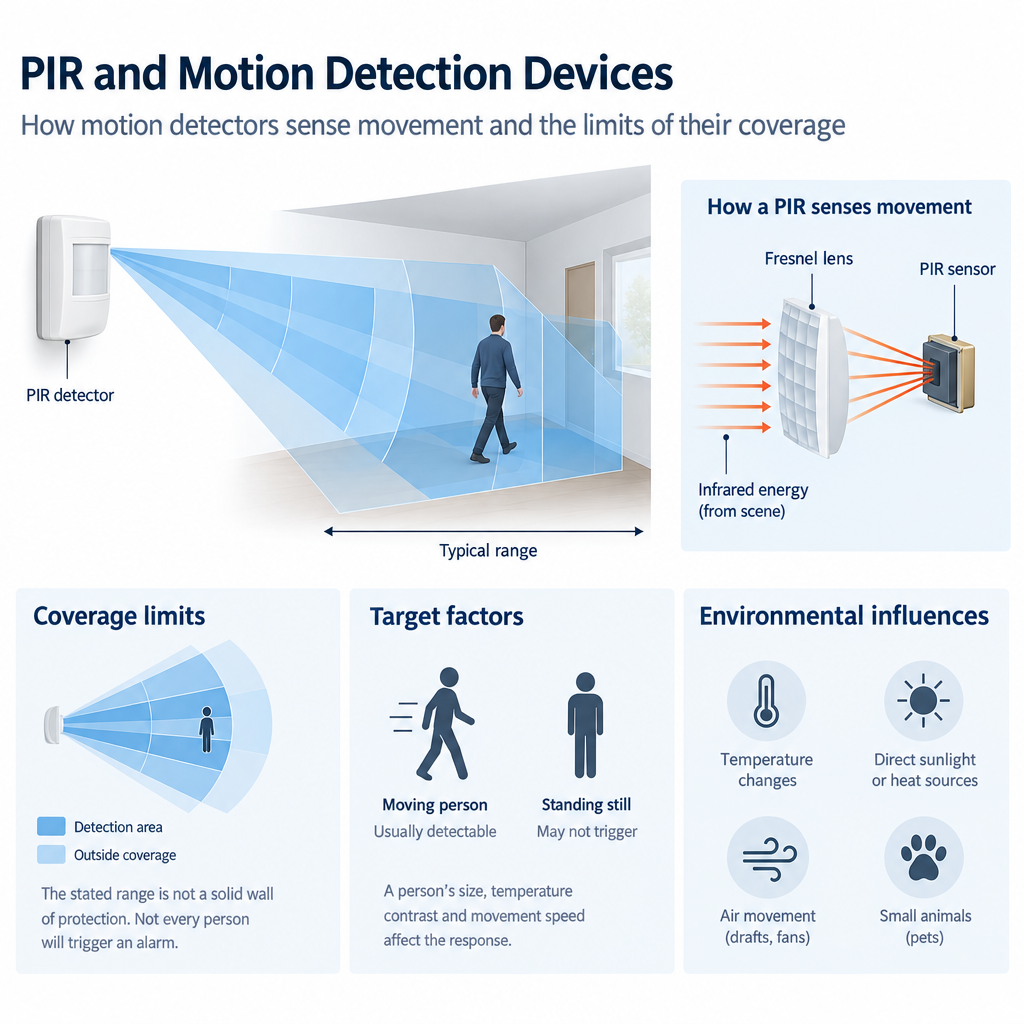
You will be able to explain what common motion detectors sense and judge whether their coverage suits the movement you need to detect. A detector’s stated range is useful, but it does not mean every person anywhere within that distance will trigger an alarm.
How motion detectors sense movement
A passive infrared (PIR) detector responds to changes in infrared radiation, or heat energy, reaching its sensor. “Passive” means it does not transmit a signal to detect movement. A PIR is not a camera and does not identify a person. A moving person can change the heat pattern it receives, while a person standing still may not produce enough change for a response.
The Fresnel lens—the shaped plastic window on many PIRs—directs infrared energy from different parts of the scene onto the sensor. These sensing regions form a detection pattern: a three-dimensional arrangement of areas where movement can be noticed, not a solid wall of protection. As a target moves between regions, the detector evaluates the changing signal. Its response depends on factors such as the target’s size, its temperature contrast with the background, its direction of travel, and the detector’s design.
A microwave motion detector transmits radio-frequency energy and measures changes in the energy reflected back. Movement can cause a Doppler shift, a change in the returned signal associated with relative motion. Microwave detection does not require a warm target, but moving fans, machinery, or structures may also produce a response. Depending on the device and building materials, microwave energy may pass through some glazing or light partitions. Its effective boundary can therefore extend beyond the room you intended to protect.
A dual-technology detector combines two sensing methods, commonly PIR and microwave. Many models require both methods to register movement before declaring an alarm. This can reduce responses to disturbances that affect only one method. It is not a guarantee against unwanted alarms or missed movement: operating logic varies, and movement missed by one method may not produce a combined alarm. Check the instructions and selected mode for the device you are using.
Coverage depends on the path taken
A manufacturer’s coverage drawing shows an intended pattern under specified mounting conditions. The maximum distance shown is not a promise of detection across the full width or height of a room. PIRs generally respond more clearly when a person crosses sensing regions than when they move directly toward the detector along a narrow path. Coverage close to or directly below a detector also varies by model. Read both the plan and side-view diagrams rather than assuming every PIR has the same footprint.
Cabinets, shelving, open doors, and other solid objects can block a PIR’s view, leaving hidden routes within its quoted range. Do not count on a standard PIR to detect a person through glazing. Conversely, a microwave detector may respond to movement beyond a lightweight boundary. Neither device’s coverage can be judged from the room outline alone.
A “pet-immune” label does not mean all animal movement will be ignored. The animal’s size and distance from the detector, and whether it can climb into a more sensitive part of the pattern, can affect the result. Use the manufacturer’s stated conditions rather than treating the label as a universal setting.
Environmental influences and a field judgment
PIR performance depends partly on the contrast between a moving target and its background. Warm surroundings can reduce that contrast. Changing sunlight on a surface, sun-heated blinds moving in the field of view, or heated air directed toward a detector may affect its response under some conditions. For microwave sensing, moving equipment or activity beyond a partition may be more relevant than temperature. An unexpected response does not automatically mean the detector is faulty; first consider what each sensing method could be detecting.
Consider a stockroom with tall shelving. A PIR aimed down an aisle may respond when you cross its pattern at the far end but respond less consistently when you approach it straight along the aisle. The shelves may also hide a route behind them. Increasing sensitivity cannot make the PIR see through shelving and may introduce unwanted responses. Compare the actual travel paths and obstructions with the device’s documented pattern before deciding whether it suits the space. Mounting choices are covered in Detector Positioning and Installation.
When coverage is checked on site, use the manufacturer’s test guidance and consider the intended movement paths rather than relying on one pass. Coordinate testing with the responsible person to avoid an unintended alarm. An indicator on the detector, if fitted and enabled, may show that the device responded; by itself, it does not prove the control panel received and acted on the event. That full response is verified during System Testing and Commissioning.
Key Terms
- PIR: Passive infrared detection of changes in received heat energy.
- Fresnel lens: A lens that directs infrared energy from different parts of a scene onto a PIR sensor.
- Detection pattern: The sensing regions in which movement may be detected.
- Doppler shift: A change in a reflected microwave signal associated with movement.
- Dual-technology detector: A device combining two sensing methods, commonly PIR and microwave.
Knowledge Check
Question: A PIR’s stated range reaches the far wall of a stockroom, but shelving blocks part of the route through it. Can you assume that route is protected?
Answer: No. Range does not overcome an obstruction. Compare the route and shelving with the detector’s actual coverage pattern.
Question: Why might movement behind a light partition affect a microwave detector even though a PIR cannot see that movement?
Answer: Microwave energy may pass through some light materials, while the partition blocks the PIR’s view. Whether a dual-technology device declares an alarm depends on its design and operating logic.