Industrial Safety, Fault-Finding, and Troubleshooting
A stopped machine is not automatically safe to approach. In this lesson, you will recognize what a safety function is intended to do, identify energy that may remain after a stop, and use status information to narrow a fault before arranging authorized isolation or qualified help. The goal is a clear fault report—not a reason to bypass a safeguard.
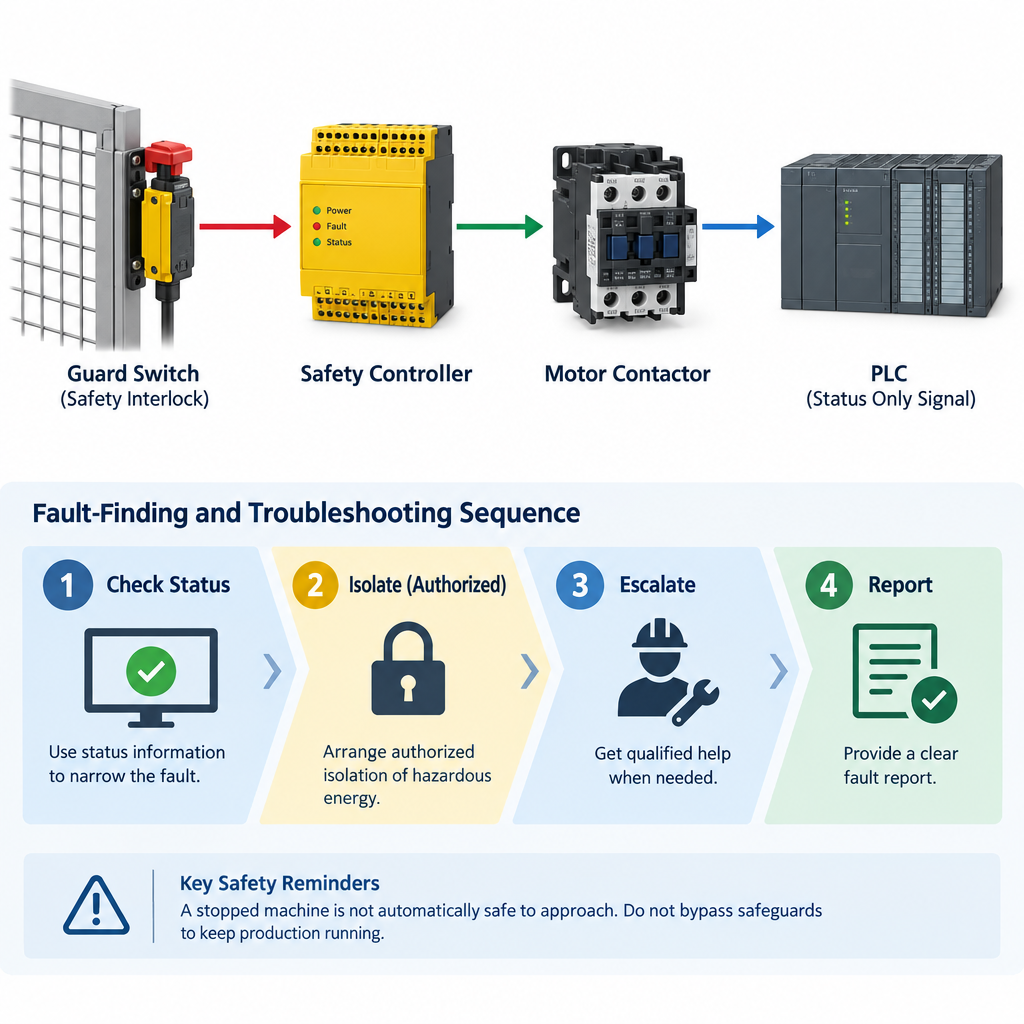
Understand what a safety fault tells you
A safety function is a protective action intended to reduce risk when a defined condition occurs. A guard interlock, for example, monitors an access guard so that hazardous motion is prevented or stopped according to the machine’s design. An emergency stop allows someone to initiate a stop in an emergency. These are not ordinary Start and Stop controls, and they must not be defeated to keep production running.
A displayed guard fault is a useful clue, but it does not identify the failed component. The guard may be open, or there may be a problem with its switch, wiring, or associated control equipment. Nor does a status message prove that the safety function has been tested and works correctly. Do not bridge terminals, change logic, manually actuate an interlock, or repeatedly reset a fault to “see if it goes.” Testing a safety function requires an approved procedure and appropriate authorization.
A stop does not remove hazardous energy
Hazardous energy includes electrical power and stored or moving energy that could cause injury. A stopped conveyor may still have an energized electrical supply or tension in its belt. Elsewhere on a machine, a raised assembly may move under gravity, a pneumatic or hydraulic system may retain pressure, or equipment may remain hot. The relevant sources depend on the equipment; use its energy-control information and site procedures rather than assuming one switch removes every hazard.
Lockout/tagout (LOTO) is an authorized method of isolating energy sources and securing them against reenergization during work. Before access to a hazardous area, authorized personnel identify and isolate the relevant sources, address stored energy, and verify isolation using the method required for that equipment. Electrical absence-of-voltage testing and other specialist checks are for suitably qualified people following approved procedures. An emergency stop, a Stop command, or a screen showing “stopped” is not a substitute for isolation.
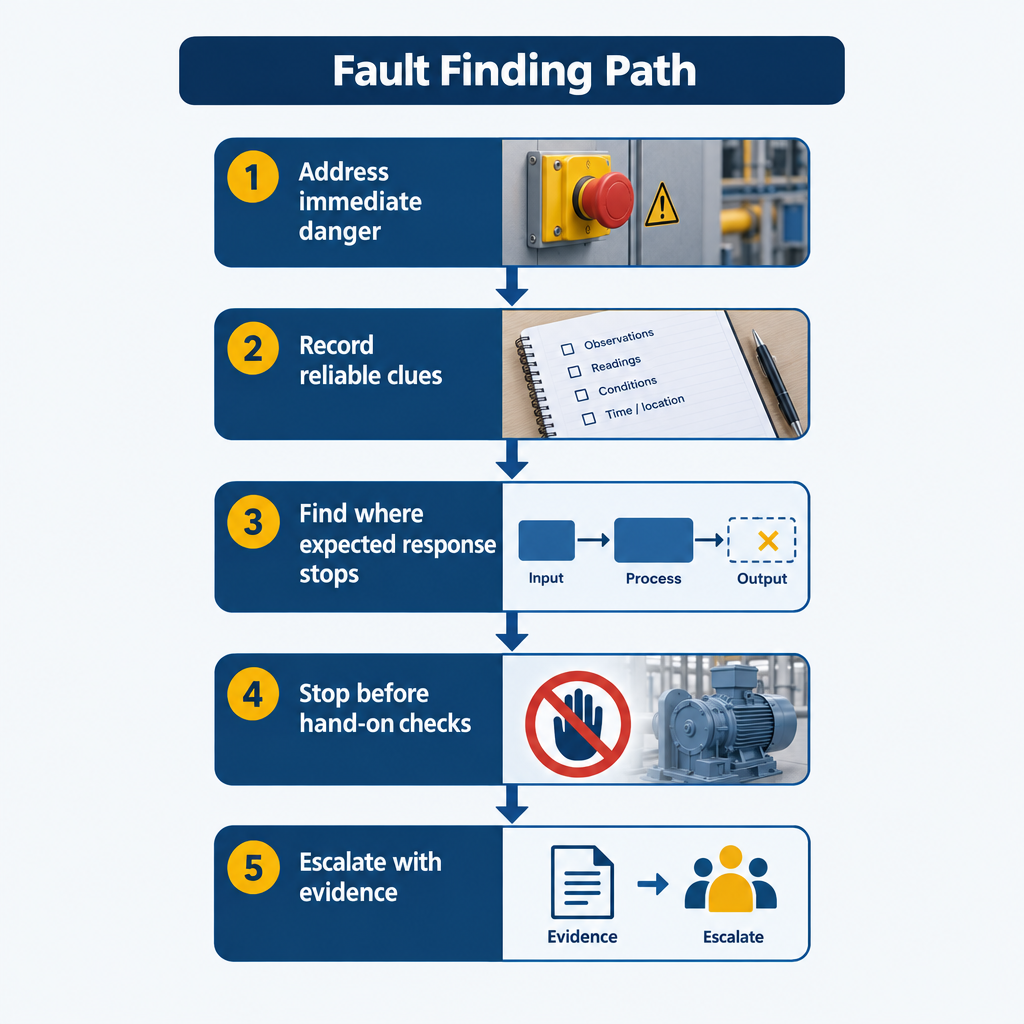
Follow a fault-finding path that respects the safety boundary
- Address immediate danger first. If someone is at risk, follow your site’s emergency procedure. Use an emergency stop if it is appropriate and safe to reach, keep clear of hazards, and notify the responsible person. Do not begin routine diagnosis while an immediate danger remains.
- Record reliable clues. From a safe location, note what was requested, what the equipment actually did, and the exact messages displayed. Record their order and time if available. Compare screen indications with what you can observe without approaching the hazard. Treat an old, missing, or uncertain status value as unconfirmed—not as proof of a healthy condition.
- Find where the expected response stops. Using status views you are permitted to access, ask whether a safety condition is reported, whether the run request was accepted, and whether a drive or controller reports a fault. Keep each reported state separate from physical movement. No start permission calls for a different investigation from a reported run command with no motion. Do not force outputs, alter logic, or issue repeated start commands to test a guess.
- Stop before hands-on checks. If checking a guard, device, motor, or wiring requires access to a hazard, arrange isolation through authorized personnel. Even after isolation, inspect or test only within your authorization and the approved work plan. Energized testing requires separate authorization and controls; this lesson does not authorize it.
- Escalate with evidence. Report the messages, commands, observed response, checks completed, and anything still unverified. Escalate an unexplained or recurring safety fault, or suspected failure of a safeguard, rather than simply clearing its indication. Return-to-service checks and restart must follow the site’s approved procedure after the cause is addressed, guards are restored, and people are clear.
A conveyor with a guard fault
Consider a conveyor that stops and displays “guard fault.” From a safe position, you can record the message, observe whether the guard appears closed without touching it, and confirm that the belt is stopped. You cannot conclude that the interlock switch has failed—or that the belt cannot move. Tell the responsible person what you observed and arrange authorized isolation before anyone opens the guard or physically inspects components in the hazardous area. Clearing the display or replacing a device would not, by itself, verify that the safety function works.
Knowledge Check
Question: A drive shows “off,” and its isolator has been locked, but an actuator may still be held under pressure. Is the drive indication enough to begin work on the actuator?
Answer: No. The drive indication says nothing about stored pressure. The relevant energy sources must be addressed and isolation verified under the approved procedure before work begins.
Key Terms
- Safety function: A protective action intended to reduce risk when a defined condition occurs.
- Guard interlock: A safeguard that monitors an access guard for a protective control function.
- Emergency stop: A means of initiating a stop in an emergency; it is not energy isolation.
- Hazardous energy: Electrical, mechanical, pressure, heat, or other energy that could cause injury.
- Lockout/tagout (LOTO): An authorized method of isolating and securing energy sources against reenergization during work.